
Protect published websites – open the door to new use cases
You can now create published websites that only the right people can access. This allows for entirely new types of experiences – without accounts, passwords, or complicated systems. The visitor simply enters their email and receives a magic link that lets them in.
This is perfect when you want to share content, but not with the whole world.
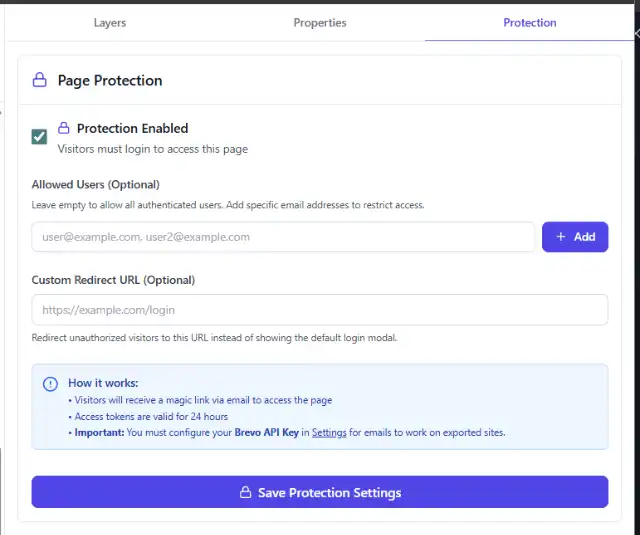
In the editor, you can add email addresses that should have access to the page. Separate with commas for multiple addresses.
👥 Member area – without a membership platform
Do you want a simple membership section? Now you can.
You can create a space where only invited people have access, for example:
Member materials
Bonus content
Guides and training
Documents and resources
Community pages
The visitor does not need to create an account – they just click the link in their email and they're in.
🧪 Drafts and projects that only certain people should see
Perfect for:
Client drafts
Design proposals
Project materials
Working versions of pages
Internal reviews
You can share a link with a client or colleague and know that no one else will have access to it.
🗂️ Internal resources and workspaces
If you want a simple internal space without building a whole intranet, you can use the protection for:
Internal instructions
Checklists
Documentation
Procedures and processes
Onboarding materials
It's a convenient way to gather everything in one place – while still keeping it private.
🎓 Training materials and course portals
You can create:
Course modules
Lessons
Video walkthroughs
Downloadable materials
Assignments and exercises
And only give access to participants via their email.
🎁 Campaigns and exclusive content
The protection also works excellently for:
VIP campaigns
Early access pages
Product launches
Special offers
Press materials
You decide exactly who gets to see what – and when.
📁 Shared documents and resources
If you want to share files or information with a limited group, you can create a simple portal for:
Partner documents
Press kit
Manuals
Contract templates
Project folders
Everything behind a secure login via email.
🎉 Summary
Protected published websites make it possible to create:
Member areas
Client portals
Internal resource pages
Course and training spaces
VIP campaigns
Shared project drafts
Private document spaces
…all without building a whole user system.